Country days tracker for iPhone and Android
Track your daysfor visas, taxand residency.
Countr counts the days you spend in each country and shows how close you are to every limit. It finds your past trips in your photos.
No account needed. Your travel data stays on your phone.
- 130 trackers
- 40 countries
- 63 languages
How it works
Countr finds your past trips in your photos.
Your phone saves the date and the place of most photos and videos you take. Countr reads only that, on your phone, and turns it into a list of trips with dates.
- 1Countr looks at the photos on your phone.
- 2It reads the date and the place of each one.
- 3It groups them into trips. You can change any date or add a trip by hand.
Your pictures are not copied or sent anywhere.













- Portugal, 12 – 22 Mar: 11 days
- Spain, 23 – 29 Mar: 7 days
- Japan, 3 – 14 May: 12 days
After that
Countr keeps counting for you.
It adds each new day.
If you allow location, Countr notes the country you are in every day. You do not have to open the app.
It shows how close you are to each limit.
Follow the rules that matter to you: visa stays, tax residency, and residency or citizenship. Each one is a card with your days and the limit.
See all trackersIt warns you before you go over.
When a limit gets close, your phone shows a reminder, so you can plan your next trip in time.
It makes a report you can send.
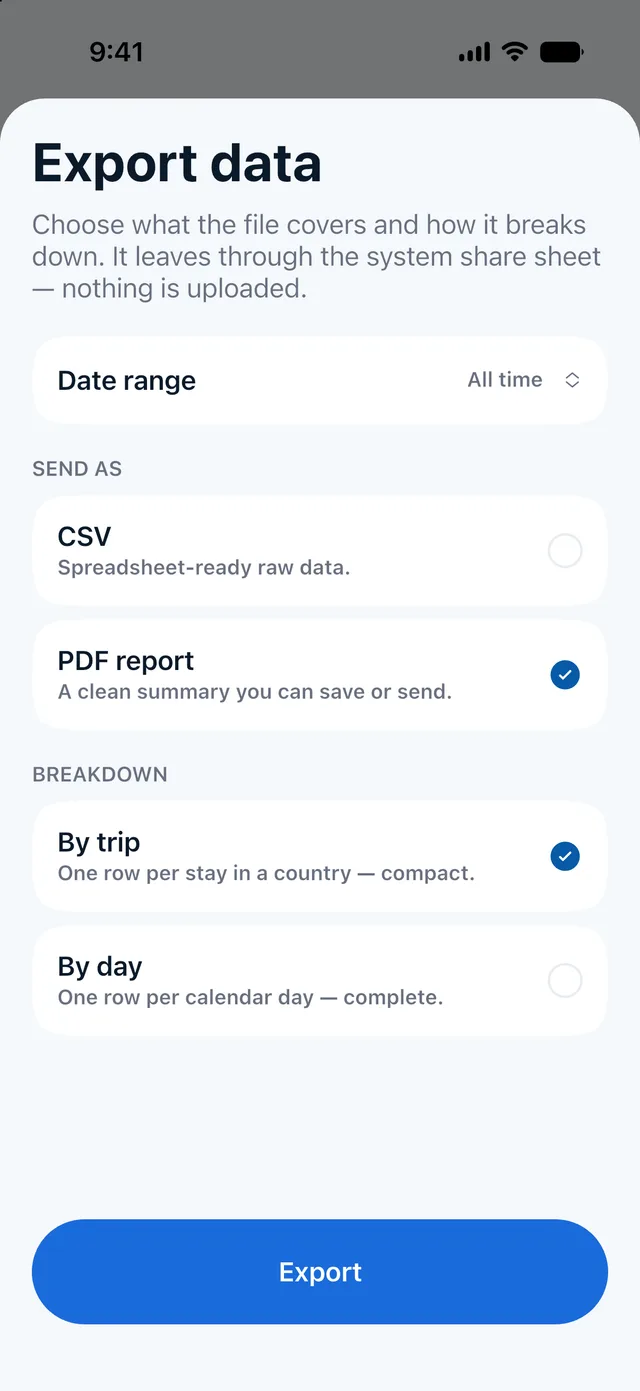
Pick any dates and get a PDF or a spreadsheet file for your accountant or lawyer. It is made on your phone.
See a sample reportThe app
Everything on five simple screens.
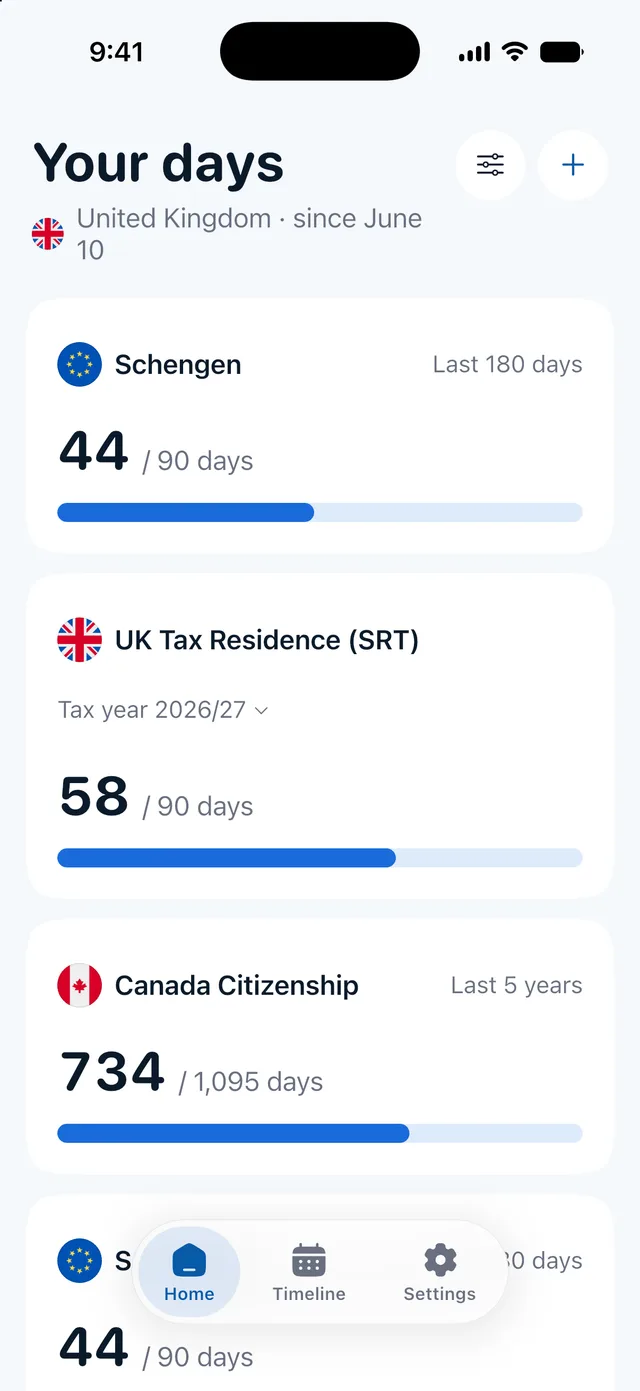
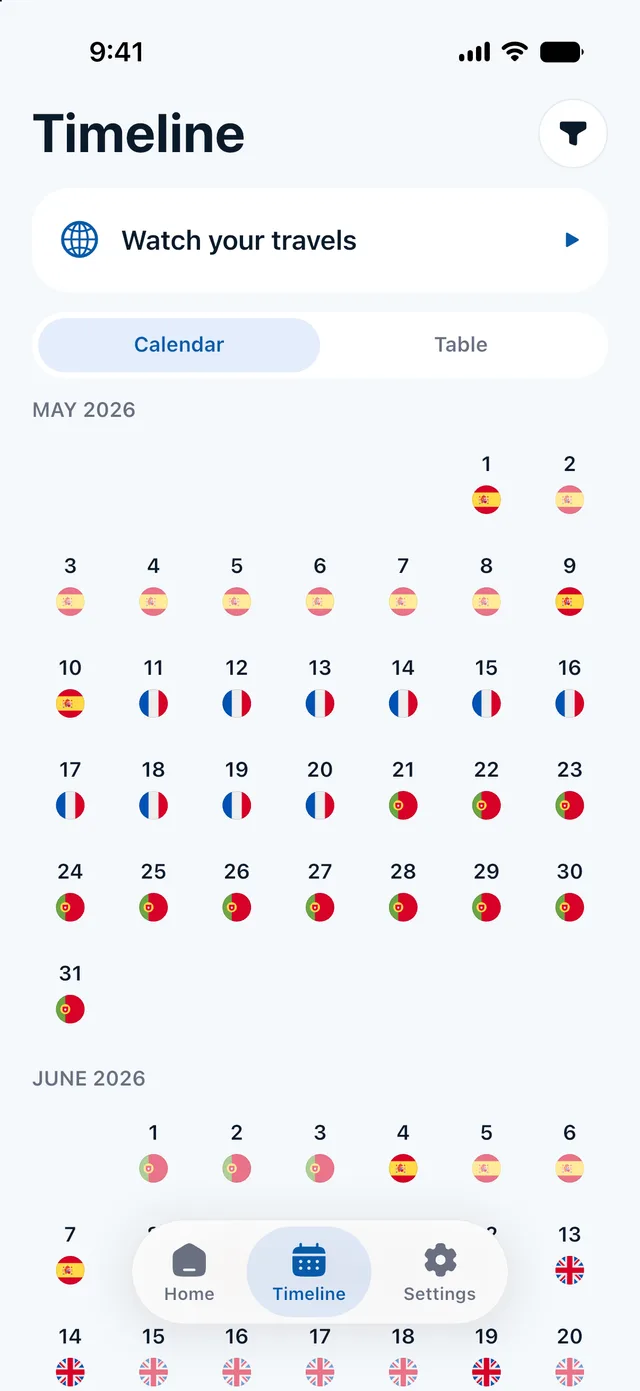
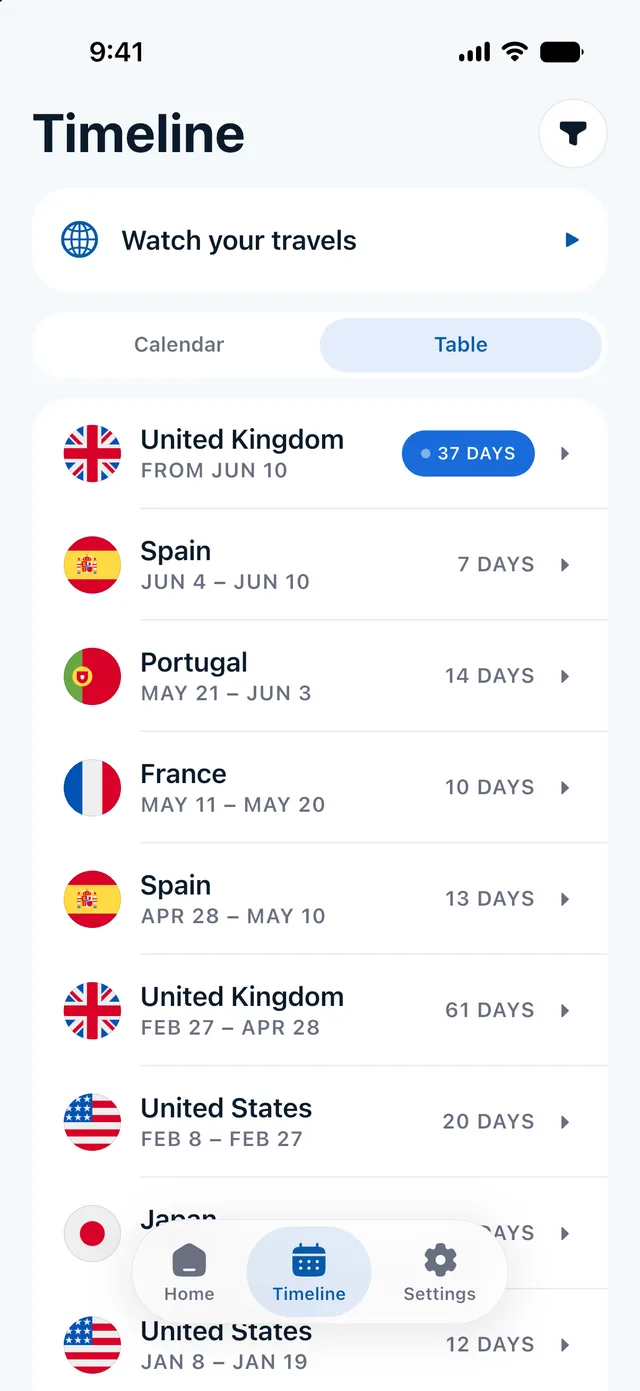
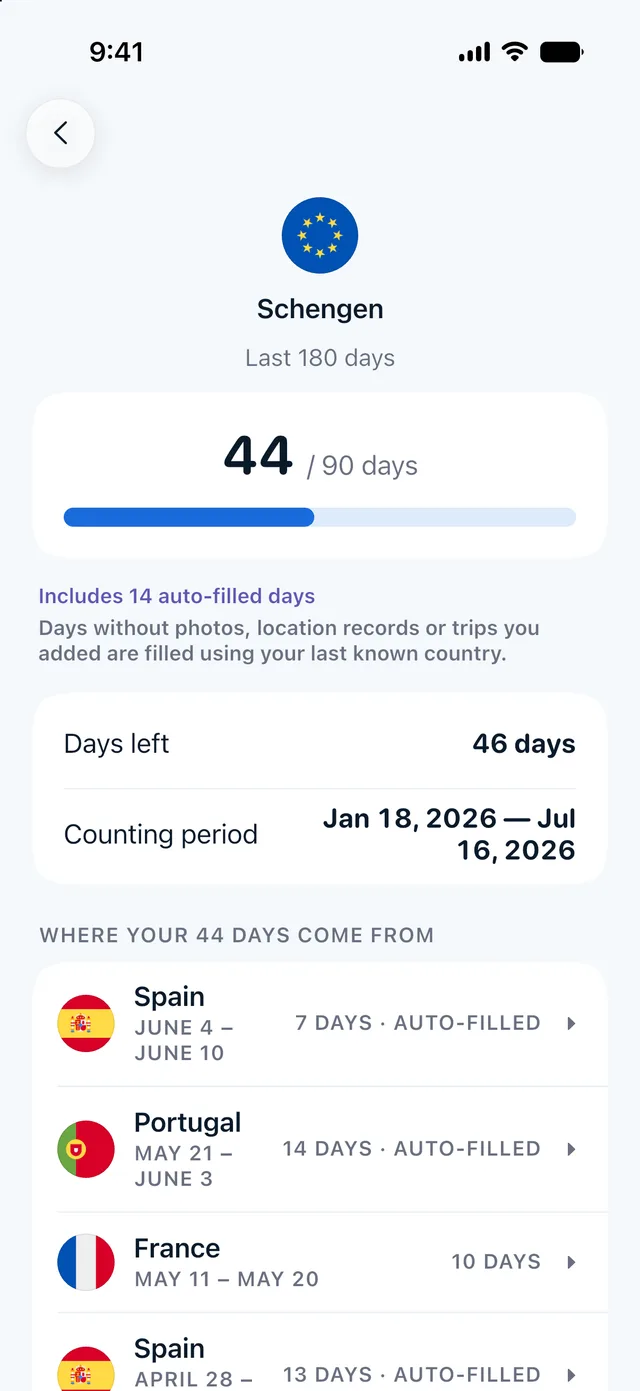
Every rule you follow is a card: the days you have used, the limit, and a bar. The bar turns amber when you get close.
130 trackers in 40 countries
Trackers for visas, tax and residency.
Each tracker follows one official rule and counts your days the way that rule does. Follow as many as you need, or make your own.
Visa limits
How long you can stay as a visitor, and when your days free up again.
 Schengen Tourist Visa or Visa-Free Visit90 days in any 180 days
 US Visa-Free Visit (ESTA)90 days for each entry
 UK Visitor Visa or Visa-Free Visit184 days in one visit
 Türkiye Tourist Visa or Visa-Free Visit90 days in any 180 days
 Thailand Visa-Free Visit14, 15, 30 or 90 days in one visit
 UAE Visa-Free Visit90 days in any 180 days
Tax residency
The day counts behind tax residency, including about 30 US state rules.
- UK Tax Residence (SRT)15, 45, 90, 120 or 182 midnights in each tax year from 6 April
- US Tax Residence (Substantial Presence)183 days over 3 years, with earlier years weighted less
 Portugal Tax Residence183 midnights in any 12 months
 Canada Tax Residence182 days in each calendar year
 Cyprus Tax Residence — 60-Day Rule60 midnights in each calendar year
- New York Tax Residence183 days in each calendar year
Residency
Days you need for a residence permit, settlement or citizenship, and the time away you must stay under.
- UK Settlement (ILR) — Getting ItYour 3, 5 or 10 qualifying years, with at most 180 days away in any 12 months. Shows the day you can apply.
- Canada PR — Keeping It730 days in any 5 years
- US Green Card — Time Away180 days away in one trip
 Australia PR — Return Visa730 days in any 5 years
- Canada Citizenship1,095 days in any 5 years
- US Citizenship — Time in the US913 days in any 5 years
Free calculators
Check a rule by hand, for free.
No sign-up. When you want it done for you every day, the app counts all 130 rules automatically.
- VisaSchengen 90/180 calculatorDays used, days left, and the last day you can stay on your next trip.
- Tax residency183-day rule calculatorYour days in one country in a calendar year or any 12 months, against 183.
- Tax residencyUS Substantial Presence TestYour weighted US days over three years, and how many days you have left.
Privacy
Your travel history stays on your phone.
Where you have been is personal. Countr does all its work on your phone, so we never see your trips.
- You don't need an accountThere is no sign-up, email or password. You open the app and start.
- Your photos stay on your phoneCountr reads only the date and place of each photo. It does not copy or send the pictures.
- Your places and dates stay tooCountries, dates, locations and day counts are kept on your phone. The app's usage statistics never include them.
- You can delete everythingOne button in Settings erases all your data. Another erases only your location history.
Compare
How Countr compares with other apps.
There are other good apps for this, and some do things Countr does not. The table shows a few key points; each comparison page has the full details and sources.
| Feature | Countr | Bounded | Immio | Country Days Tracker |
|---|---|---|---|---|
| Past trips from photos | ✓ | ✓ | ✓ | ✓ |
| PDF report and CSV | ✓ | ✓ | CSV only | ✓ |
| Home Screen widgets | ✓ | ✓ | – | ✓ |
| Languages | 63 | 1 | 7 | 12 |
| Location never used to track you* | ✓ | – | ✓ | ✓ |
| No account needed | ✓ | ✓ | ✓ | ✓ |
Checked 30 September 2026 on each app's website and US App Store page. *Based on each app's App Store privacy label, "Data Used to Track You" section. See every comparison and source.
What does Countr do?
Countr counts the days you spend in each country and checks them against the rules you follow: visa limits, tax residency day counts, and the days you need for residency or citizenship. It finds your past trips in your photos and adds new days as you travel, if you allow location.
How does Countr find my past trips?
Your phone saves a date and a place with most photos and videos. Countr reads only those two things, on your phone, and turns them into trips. You can check every trip, change dates, and add trips by hand.
Do my photos or my travel history leave my phone?
No. Your photos, places, dates and day counts stay on your phone. There is no account. Countr does use a few services for app statistics, crash reports and subscriptions, but they never receive where you were or when. The privacy policy lists each one.
What happens on days without a photo?
You choose. Countr can fill short gaps, fill all missing days with your last known country, or leave gaps empty. Filled days are marked "Auto-filled", so you always see which days come from a photo or location and which were filled in.
Do I have to allow location access?
No. Photos and your own trips are enough to build a record. If you allow location, Countr notes when you arrive in a new place, using the phone's low-power location updates, not constant GPS.
Which rules can Countr track?
Countr has 130 ready-to-use trackers in 40 countries: 15 for visas (like Schengen 90/180 and the US ESTA), 67 for tax residency (like the UK Statutory Residence Test, the US Substantial Presence Test and about 30 US state rules), and 48 for residency and citizenship (like UK settlement and Canada PR). More are coming, and you can also make your own tracker. See the full list on the Trackers page.
Will Countr warn me before I reach a limit?
Yes. When a limit gets close, Countr sends a reminder on your phone, so you can plan your next trip before it is too late.
Can I send my travel history to an accountant or a lawyer?
Yes. Choose any date range and export a PDF report or a CSV file for spreadsheets, listed by trip or by day. The file is made on your phone and goes only where you send it.
Does Countr tell me if I am a tax resident?
No. Countr keeps an accurate record and does the counting, but tax residency and visa decisions can depend on more than days. Use the record together with official guidance or a qualified adviser.
How much does Countr cost?
Countr Pro is a subscription with a free trial. The App Store or Google Play shows the plans and the exact price in your currency before you confirm, and you can cancel any time in your Apple or Google account settings.
Is Countr on iPhone and Android?
Yes, both. Countr works on iPhone (iOS 17 or later) and on Android phones (Android 7 or later).
Which languages does Countr speak?
63, including right-to-left languages such as Arabic and Hebrew. Countr follows your phone's language.

Every day, in every country, counted.
Download the app for iPhone and Android. Start with your photos and see your days for every rule you follow.